By 2026, the way people search for information looks nothing like it did even three years ago. Instead of typing a few keywords into Google and digging through pages of links, more people are asking AI tools direct questions and getting answers backed by real sources — instantly.
This shift toward AI-powered search has been driven by tools like Perplexity AI, which has grown from a niche product into one of the most talked-about research assistants on the internet. According to recent industry data, Perplexity now handles hundreds of millions of queries per month, and its usage keeps climbing as more students, journalists, marketers, and business owners discover what it can do.
So why has Perplexity AI become so popular?
Part of it is trust. Unlike a typical chatbot that just generates text from memory, Perplexity actively searches the live web and shows you exactly where its information came from — with clickable citations. That’s a big deal if you’ve ever been burned by an AI tool that confidently made something up.
In this guide, you’ll learn what Perplexity AI actually is, how it works, and how to use it step by step for real research tasks — whether that’s writing a college paper, analyzing competitors, or putting together a market report for your small business.
We’ll also cover the best prompts to use, how Perplexity compares to ChatGPT, what the Pro plan actually offers in 2026, and the mistakes that trip up most beginners.
Let’s dive in.
What Is Perplexity AI?
Perplexity AI is an AI-powered research and search tool. You ask it a question in plain English, and instead of just generating an answer from memory like a traditional chatbot, it searches the live internet, reads through multiple sources, and gives you a clear, summarized answer — with footnotes linking back to where each piece of information came from.
Think of it less like a chatbot and more like a research assistant who reads the internet for you, takes notes, and hands you a summary with all the receipts attached.
A Quick History
Perplexity AI launched in 2022, built by a small team of former engineers from companies like Google, Meta, and OpenAI. The idea was simple but ambitious: combine the conversational ease of a chatbot with the real-time accuracy of a search engine.
Over the following years, Perplexity expanded rapidly. It introduced features like Pro Search, Deep Research, file uploads, and eventually its own AI browser called Comet. By 2026, Perplexity had shifted its business model entirely toward subscriptions, dropping ads in favor of Pro and Max plans as its main revenue source.
How It Works
When you type a question into Perplexity, here’s roughly what happens behind the scenes:
It interprets your question and figures out what you’re really asking.
It searches the live web, often pulling from dozens of pages.
It reads and cross-references those sources.
It generates a summarized answer in natural language.
It attaches citations — small clickable numbers — next to each claim, linking back to the original source.
This entire process usually takes just a few seconds.
AI-Powered Search Engine Concept
Traditional search engines, like Google, give you a list of links and leave the reading and synthesizing up to you. Perplexity flips that. It does the reading for you and gives you a direct, synthesized answer — while still showing you where to verify the information yourself.
Why It’s Different From Traditional Google Search
Google is built around ranking web pages. Perplexity is built around answering questions.
With Google, you might click through five or six links to piece together an answer. With Perplexity, you typically get a single, well-organized response in seconds — along with the sources, so you’re not just trusting a black box.
That said, Perplexity isn’t a replacement for all searching. For shopping, local businesses, or browsing, Google and other search engines still have their place. But for research-heavy questions — “What are the latest studies on X?” or “How do three companies compare on Y?” — Perplexity tends to save a huge amount of time.
Key Features of Perplexity AI
Real-Time Web Search
Perplexity doesn’t just rely on training data from months or years ago. It actively searches the current web, which means it can answer questions about recent news, new product launches, or anything that’s changed recently.
Source Citations
Every factual claim Perplexity makes is typically backed by a small numbered citation. Click it, and you’re taken straight to the original article, study, or webpage. This is one of the biggest reasons researchers, students, and journalists trust it more than a standard chatbot.
Deep Research
Deep Research is Perplexity’s most powerful research mode. Instead of a quick answer, it conducts a multi-step investigation — reading dozens of sources, cross-referencing data, and producing a long-form, structured report on a topic.
By 2026, Deep Research has become advanced enough to generate not just written reports, but also presentations, spreadsheets, and simple dashboards directly from your research request.
AI Summaries
For any topic, Perplexity can condense complex information into a digestible summary. This is especially useful when you’re trying to quickly understand a dense academic paper, a long news article, or a technical report.
File Analysis
You can upload documents — PDFs, spreadsheets, images, and more — and ask Perplexity questions about them. This is incredibly useful for analyzing reports, contracts, datasets, or academic papers without reading every page yourself.
Research Collections
Collections let you organize your research into folders or “threads” by topic. If you’re working on multiple projects — say, a thesis and a freelance client report — you can keep your research neatly separated and easy to revisit later.
Perplexity Spaces
Spaces are shared research environments. They’re particularly useful for teams or study groups, since multiple people can contribute files, notes, and queries to the same workspace.
Follow-Up Questions
Perplexity remembers the context of your conversation, so you can ask follow-up questions naturally — “What about in Europe?” or “Can you compare that to 2023 data?” — without repeating your entire original question. By 2026, Perplexity’s memory has improved significantly, allowing it to recall relevant context from past sessions more reliably than earlier versions.
[Image 2] Prompt: “Step-by-step diagram showing the Perplexity AI research process: typing a question, AI searching the web, reviewing cited sources, asking follow-up questions, and saving results, clean infographic style, 16:9 ratio”
How to Use Perplexity AI for Research
Here’s a practical, step-by-step walkthrough you can follow the next time you sit down to research something.
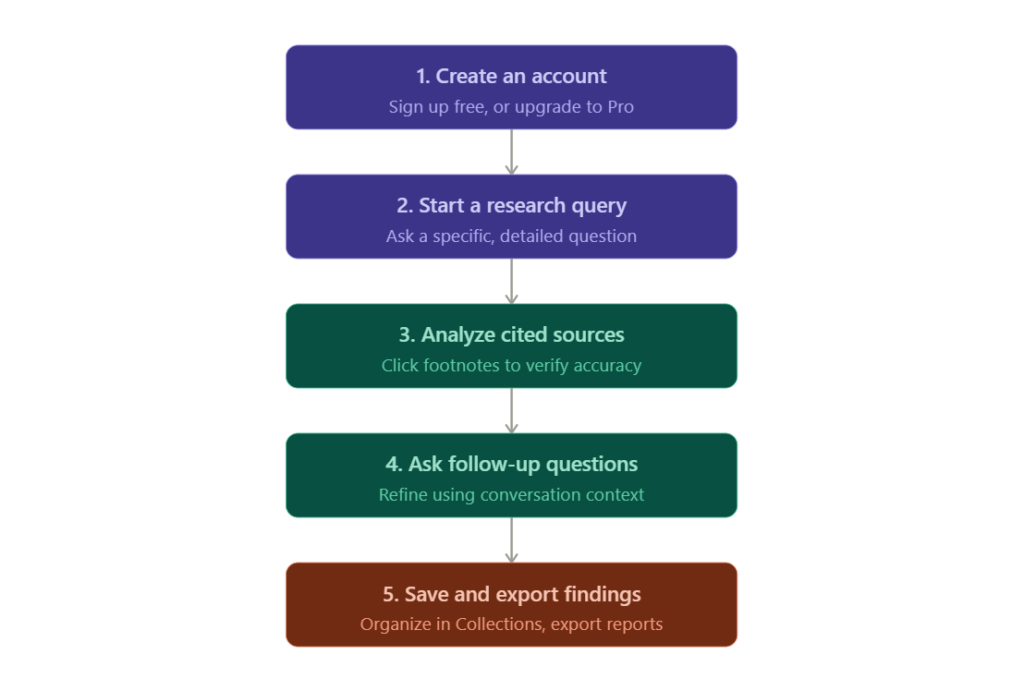
Step 1: Create an Account
Head to Perplexity’s official website and sign up using your email, Google account, or Apple account. The free plan is genuinely usable — you get access to standard search, source citations, and a limited number of Pro Searches and Deep Research queries each day.
If you’re a student, it’s worth checking whether your school offers a discounted Education plan, since several universities have partnered with Perplexity for verified student access.
Step 2: Start a Research Query
Type your question into the search bar just like you would talk to a knowledgeable colleague. Be specific.
For example, instead of asking “Tell me about electric cars,” try: “What are the top three electric vehicle manufacturers by U.S. sales in 2025, and how do their price ranges compare?”
The more specific your question, the more useful and focused the answer will be.
Step 3: Analyze Sources
Once Perplexity gives you an answer, don’t just take it at face value — click through the citations. This is where Perplexity really shines compared to a standard chatbot.
Look at where the information is coming from. Is it a peer-reviewed journal? A government website? A random blog? This step is essential for academic work, journalism, or any situation where accuracy really matters.
Step 4: Ask Follow-Up Questions
This is where research starts to feel like a conversation. If the first answer raises new questions, just ask them.
For example: “You mentioned a 2024 study — can you summarize its methodology?” or “How does this compare to the situation in Canada?”
Perplexity will use the context of your previous questions to give a more relevant follow-up answer.
Step 5: Save Research
Use Collections to save and organize your research threads by topic or project. This is especially helpful for longer projects like a thesis, a multi-part blog series, or an ongoing client report, where you’ll want to revisit and build on earlier findings.
Step 6: Export Findings
Depending on your plan, you can copy your research into documents, export reports, or — with Deep Research on paid plans — generate structured outputs like spreadsheets or presentation-ready summaries. This is a huge time-saver if you need to turn raw research into a deliverable quickly.
A Practical Example
Let’s say you’re writing a blog post about remote work trends. You might:
Ask Perplexity, “What are the latest remote work statistics in the U.S. for 2025–2026?”
Review the cited sources to confirm they’re from credible outlets like Pew Research or the Bureau of Labor Statistics.
Ask a follow-up: “How has this changed since 2022?”
Save the thread to a Collection called “Remote Work Blog Research.”
Use the findings — in your own words, with proper attribution — as the factual backbone of your article.
Best Research Prompts for Perplexity AI
Here’s a table of 20 prompts you can adapt for your own research needs.
| # | Category | Prompt Example |
|---|---|---|
| 1 | Academic | “Summarize the main findings of recent peer-reviewed studies on [topic] from the last two years.” |
| 2 | Academic | “Explain [complex concept] in simple terms a college freshman could understand.” |
| 3 | Academic | “What are the most cited papers on [topic] and what do they argue?” |
| 4 | Market Research | “What are the current market size and growth projections for [industry] in the U.S.?” |
| 5 | Market Research | “What are the biggest trends shaping the [industry] in 2026?” |
| 6 | Market Research | “Who are the top five companies in [industry] and what’s their market share?” |
| 7 | SEO Research | “What are people commonly searching for related to [topic]?” |
| 8 | SEO Research | “What questions do people frequently ask about [topic]?” |
| 9 | SEO Research | “Summarize the top-ranking articles for the keyword [keyword] and what they cover.” |
| 10 | Competitor Research | “Compare the pricing and features of [Company A] and [Company B].” |
| 11 | Competitor Research | “What recent news or product launches has [company] announced?” |
| 12 | Competitor Research | “What are customers saying about [company] in recent reviews?” |
| 13 | Journalism | “What’s the latest verified information on [current event]?” |
| 14 | Journalism | “What do multiple news sources say about [topic], and where do they disagree?” |
| 15 | Journalism | “Find recent statements from [organization] regarding [topic].” |
| 16 | Product Research | “What are the pros and cons of [product] based on recent reviews?” |
| 17 | Product Research | “Compare [Product A] vs [Product B] in terms of price, features, and reliability.” |
| 18 | Product Research | “What alternatives exist to [product], and how do they compare?” |
| 19 | General Research | “Give me a timeline of major events related to [topic].” |
| 20 | General Research | “What are the most common misconceptions about [topic], according to experts?” |
Perplexity AI vs ChatGPT
Both tools are popular, but they’re built for slightly different purposes. Here’s how they stack up for research tasks.
| Factor | Perplexity AI | ChatGPT |
|---|---|---|
| Accuracy for current events | Strong — pulls from live web | Depends on browsing/search features being enabled |
| Source citations | Built-in, automatic | Only when web search is used |
| Research quality | Excellent for fact-finding and synthesis | Strong, but better suited to reasoning and drafting |
| Creativity | Good, but research-focused | Excellent for creative and long-form writing |
| Content writing | Decent, but not its main strength | Very strong — widely used for drafting articles |
| Real-time web access | Core feature, always active | Available, but not the primary design focus |
| Pricing (2026) | Free plan; Pro at $20/month or $200/year | Free plan; paid tiers available at various price points |
When to Choose Perplexity
Choose Perplexity when accuracy, sourcing, and up-to-date information matter most — academic research, fact-checking, market analysis, or journalism.
When to Choose ChatGPT
Choose ChatGPT when your main task is writing, brainstorming, coding, or working through complex reasoning where you don’t necessarily need a citation for every sentence.
Many professionals in 2026 actually use both — Perplexity for gathering and verifying information, and ChatGPT for turning that information into polished content.
Perplexity AI for Students
Students have quickly become one of Perplexity’s biggest user groups, and it’s easy to see why.
Example 1: A psychology student researching a paper on sleep and memory can ask Perplexity to summarize recent studies on the topic, then click through to the original journals to cite them properly.
Example 2: A student preparing for an exam can ask Perplexity to explain a difficult concept — like the causes of the 2008 financial crisis — in simple terms, then ask follow-up questions to dig deeper into specific causes.
Example 3: A grad student working on a literature review can use Collections to organize sources by theme, making it much easier to structure their final paper.
A word of caution: always check your school’s policy on AI tool usage, and remember that Perplexity should support your research — not replace your own analysis and writing.
Perplexity AI for Content Creators
For bloggers, YouTubers, and social media creators, Perplexity is most useful as a fact-finding and idea-generation tool.
Example 1: A YouTuber researching a video on “the history of streaming services” can ask Perplexity for a timeline of major launches and milestones, complete with sources to verify dates and figures.
Example 2: A blogger writing about healthy eating trends can ask Perplexity what nutrition experts are currently saying about a specific diet trend, then use that as a factual foundation — while writing the actual article in their own voice.
Example 3: A social media manager can use Perplexity to quickly check whether a viral claim is actually true before sharing it, reducing the risk of spreading misinformation.
Perplexity AI for Businesses
Small business owners and marketing professionals are increasingly using Perplexity to speed up research that used to take hours.
Example 1: A small business owner considering a new product line can ask Perplexity to summarize current demand trends and competitor pricing in that category.
Example 2: A marketing professional preparing a client pitch can use Deep Research to generate a structured overview of an industry, including key players, recent developments, and market size estimates.
Example 3: An e-commerce business can use Perplexity to monitor what’s being said about their brand or competitors online, helping them respond to trends faster.
[Image 3] Prompt: “Small business owner and marketing professional reviewing AI-generated market research on a laptop screen, charts and notes on desk, realistic office setting, 16:9 ratio”
Perplexity AI Pro Features
Premium Benefits
Perplexity Pro costs $20 per month (or $200 per year, which works out to roughly $16.67/month). It unlocks unlimited Pro Search, a much higher daily limit on Deep Research queries, access to advanced AI models, and higher file upload limits.
Deep Research Mode
On Pro, Deep Research queries get significantly more powerful — capable of reviewing large numbers of sources and producing long, structured reports. As of 2026, Deep Research can also generate deliverables like presentations, spreadsheets, and simple dashboards directly from your research request, which is a huge time-saver for business and academic users alike.
Advanced Models
Pro subscribers can choose between multiple leading AI models for their searches and analysis, giving more flexibility depending on whether the task is research, summarization, or writing-heavy.
File Uploads
Pro increases both the size and number of files you can upload for analysis, which matters if you’re working with large reports, datasets, or lengthy PDFs.
Worth It or Not?
For casual users who occasionally look something up, the free plan is genuinely solid and may be all you need.
But if you regularly hit the daily limit on Pro Search, or you find yourself wanting Deep Research more than a few times a day, the $20/month Pro plan tends to pay for itself quickly — especially if it saves you even an hour or two of manual research each week.
The $200/month Max plan is built for power users — heavy researchers, agencies, or anyone running multiple AI-driven projects at once. For most individual researchers, students, and small business owners, Pro hits the sweet spot.
Common Mistakes to Avoid
1. Treating every answer as 100% correct. Even with citations, AI can misinterpret sources. Always verify important facts.
2. Not checking the actual sources. The citations are there for a reason — click through, especially for anything you plan to publish or cite academically.
3. Asking vague questions. “Tell me about marketing” will give you a generic answer. “What are the top three digital marketing trends for small businesses in 2026?” will give you something useful.
4. Ignoring the date of sources. Some cited articles may be older than you’d expect. Check publication dates, especially for fast-moving topics.
5. Using Perplexity for creative writing tasks it’s not built for. It can write, but tools designed specifically for long-form content often perform better for that purpose.
6. Forgetting to use follow-up questions. Many users ask one question and stop, missing out on the tool’s conversational strength.
7. Not organizing research with Collections. Without organization, longer projects can become messy fast.
8. Overloading a single query with too many questions. Break complex requests into smaller, focused questions for clearer answers.
9. Relying solely on AI summaries for academic citations. Always cite the original source, not the AI’s summary of it.
10. Not exploring Deep Research for bigger projects. Many users stick to basic search and miss out on the more powerful research mode entirely.
Tips to Get Better Results
Be specific about what you want — including time frames, locations, and the type of sources you’re interested in.
Ask Perplexity to compare multiple viewpoints when researching a debated topic, rather than just asking for “the answer.”
Use Deep Research for big-picture topics, and standard search for quick fact-checks.
When uploading files, ask targeted questions about specific sections rather than vague requests like “summarize this.”
Build on previous questions instead of starting fresh each time — context makes a big difference.
Periodically review and clean up your Collections so older research doesn’t get lost or forgotten.
Limitations of Perplexity AI
No tool is perfect, and it’s important to go in with realistic expectations.
Hallucinations. While citations help, AI tools can still occasionally misrepresent what a source actually says. Always cross-check anything critical.
Source quality varies. Perplexity pulls from the open web, which includes everything from peer-reviewed journals to low-quality blogs. The tool generally favors higher-quality sources, but it’s still on you to evaluate credibility.
Context limitations. Even with improved memory, very long or highly technical research threads can sometimes lose nuance over extended conversations.
Privacy considerations. Like most AI tools, your queries and uploaded files may be processed and, depending on your plan and settings, used to improve the service. If you’re working with sensitive or confidential information, review the privacy policy and consider enterprise-grade plans designed with stricter data handling.
Future of AI Research Tools
Looking ahead, AI research tools are likely to become even more integrated into everyday workflows.
Expect deeper integration between AI search tools and productivity software — imagine researching a topic and having the findings automatically organized into a document, spreadsheet, or presentation without manual copying and pasting. Perplexity’s move toward generating deliverables directly from Deep Research is an early sign of this trend.
AI browsers, like Perplexity’s Comet, are also becoming more mainstream, blurring the line between “searching” and “browsing” as AI assistants become capable of taking actions on your behalf, not just answering questions.
Memory and personalization will likely keep improving too, with tools remembering your research interests and preferences across sessions — making each interaction feel more like working with a long-term research partner than starting from scratch every time.
At the same time, expect growing emphasis on transparency and source verification, as users and regulators alike push for AI tools to be clearer about where information comes from and how reliable it is.
Useful Resources for Researchers
Here are some authoritative resources worth bookmarking alongside Perplexity AI.
Perplexity AI official website: The best place to start, create an account, and explore current plans and features directly from the source.
Google Scholar: A free search engine for academic papers, useful for cross-checking citations Perplexity surfaces during research.
Pew Research Center: A trusted source for U.S. survey data and social trends, often cited in research on technology, society, and demographics.
U.S. Bureau of Labor Statistics: Reliable government data on employment, wages, and economic trends — useful for business and market research.
Purdue OWL (Online Writing Lab): A helpful resource for learning proper citation formats when using research from AI tools in academic work.
Frequently Asked Questions
1. Is Perplexity AI free?
Yes. Perplexity offers a free plan that includes standard search, source citations, and a limited number of Pro Search and Deep Research queries per day.
2. Is Perplexity better than ChatGPT?
It depends on the task. Perplexity tends to be better for fact-based research with citations, while ChatGPT is often preferred for writing, brainstorming, and creative tasks.
3. Can students use Perplexity AI?
Yes, many students use it for research, summarizing studies, and understanding complex topics. Always check your school’s AI usage policy first.
4. Does Perplexity cite sources?
Yes. Source citations are one of Perplexity’s core features, with clickable links to the original content for nearly every factual claim.
5. What is Deep Research mode?
Deep Research is Perplexity’s advanced research mode that conducts multi-step investigations across many sources and can produce long-form reports and other deliverables.
6. How much does Perplexity Pro cost?
As of 2026, Perplexity Pro costs $20 per month or $200 per year.
7. Can I upload files to Perplexity AI?
Yes. You can upload documents like PDFs and spreadsheets and ask Perplexity questions about their content.
8. Is Perplexity AI accurate?
It’s generally reliable for surfacing current information with sources, but like all AI tools, it can occasionally misinterpret information. Always verify important facts.
9. What is Perplexity Spaces used for?
Spaces are shared research environments useful for teams, study groups, or collaborative projects where multiple people contribute to the same research thread.
10. Is my data private when using Perplexity AI?
Perplexity has privacy policies covering data usage, but as with any AI tool, you should review current terms — especially before uploading sensitive or confidential information.
Conclusion
Research in 2026 looks a lot different than it did even a few years ago — and tools like Perplexity AI are a big part of why.
Instead of digging through endless search results, you can ask direct questions and get clear, cited answers in seconds. That’s a genuine time-saver for students, journalists, content creators, and business owners alike.
But like any tool, it works best when you understand both its strengths and its limits. Use Perplexity to speed up the information-gathering process — then apply your own judgment, verify the sources, and add your own analysis and voice to whatever you create.
If you haven’t tried it yet, start with the free plan, experiment with a few real research questions you actually care about, and see how it fits into your workflow. Used responsibly, it might just become one of the most valuable tools in your research toolkit.