Build, deploy, and monetize AI agents — no programming knowledge required. Your step-by-step roadmap starts here.
Something extraordinary is happening in the world of software. For decades, building intelligent automation required a team of engineers, months of development, and a budget that only large companies could afford. That era is over.
In 2026, AI agents have emerged as the most transformative technology since the smartphone. They can browse the web, answer customer questions, write content, analyze data, send emails, and make decisions — all without human intervention. And thanks to a new generation of no-code AI platforms, anyone can build them.
According to Gartner’s 2026 AI Report, over 40% of new enterprise software deployed this year includes an AI agent component — up from just 8% in 2023. Meanwhile, the no-code movement has exploded, with platforms like Bolt, Lovable, and n8n reporting user growth of over 300% year-over-year.
This guide is written for the entrepreneur sitting at a kitchen table with a business idea, the freelancer looking to add high-value services, and the small business owner who needs automation but can’t afford a development team. By the end of this article, you’ll know exactly how to build your first AI agent — and how to make money from it.
What Is an AI Agent?
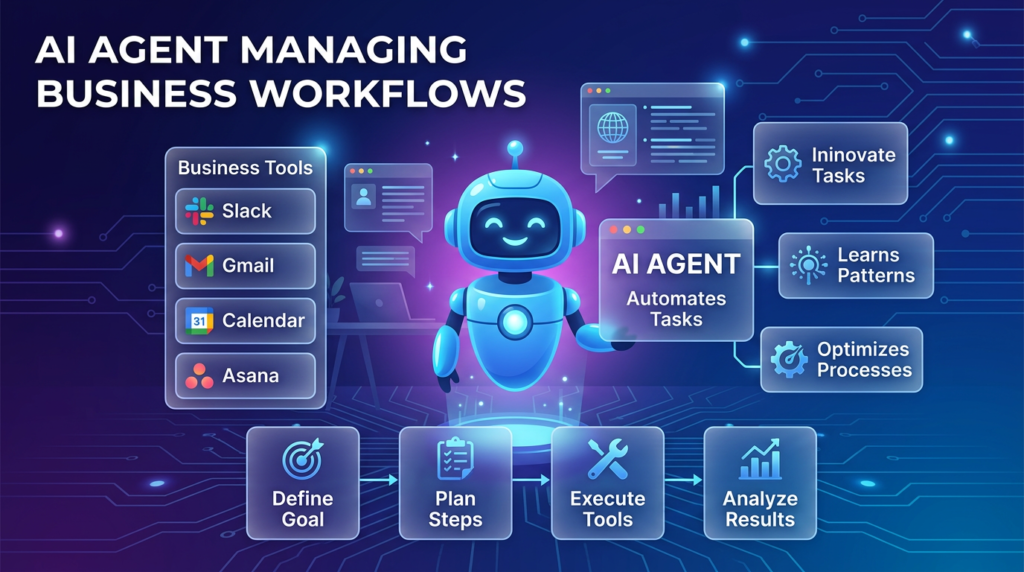
An AI agent is a software program powered by a large language model (LLM) that can perceive its environment, make decisions, take actions, and work toward a defined goal — often without continuous human input.
Think of it like hiring a highly capable virtual assistant. Unlike a simple chatbot that only responds to what you say, an AI agent can:
Plan & Reason
Break down complex tasks into steps and decide the best sequence of actions to complete them.
Use Tools
Connect to external APIs, search the web, send emails, update spreadsheets, and run calculations.
Self-Correct
Recognize when something isn’t working, try a different approach, and learn from mistakes within a session.
Act Autonomously
Execute long multi-step workflows from a single instruction, without needing you to supervise each step.
Chatbot vs. AI Agent: What’s the Difference?
A chatbot is reactive — it answers a question, then waits. An AI agent is proactive — give it a goal and it figures out how to reach it. For example, if you ask a chatbot “Find me leads for my SaaS product,” it might write a list of suggestions. An AI agent would actually search the web, compile contact data into a spreadsheet, draft personalized outreach emails, and schedule them — all on its own.
For a deeper technical overview, Anthropic’s research team has published extensive work on how modern AI agents reason and plan.
AI Agent Market at a Glance — 2026 Data
No-Code AI Tool Market Share
ChatGPT 28%Claude 18%n8n 22%Flowise 12%Bolt/Lovable 11%Others 9%
AI Agent Use Cases by Business Type
Customer Support 31%Content & SEO 22%Sales Outreach 19%Research 15%E-commerce 13%
Monthly Cost to Build AI Agent (USD)
Free Tier 35%Under $50 29%$50–$200 22%$200+ 14%
Why AI Agents Are Becoming Popular
The numbers are staggering. McKinsey’s 2026 AI Index found that businesses using AI agents reduced operational costs by an average of 23%, while increasing output quality and speed. Here’s why adoption is accelerating:
Automation Demand
72% of SMBs say they are actively looking for ways to automate repetitive tasks. AI agents are the most cost-effective solution.
Cost Savings
A single AI agent can replace 15–30 hours of manual work per week, translating to thousands in saved labor costs monthly
Speed to Market
No-code tools have compressed build time from months to hours. Entrepreneurs can test ideas and launch quickly.
API Economy Growth
Thousands of tools now offer APIs, making it trivially easy to connect AI agents to your existing business stack.
Can You Really Build an AI Agent Without Coding?
Yes — and millions of people are doing it right now. The term “vibe coding” — popularized in early 2025 — describes the practice of building software through natural language instructions alone. Platforms have evolved so rapidly that you can describe what you want in plain English and have a working agent running within an hour.
Advantages of No-Code AI Development
- Zero programming knowledge needed
- Launch in hours, not months
- Dramatically lower cost ($0–$200/month vs. $50,000+ dev cost)
- Drag-and-drop visual workflow builders
- Pre-built templates for common use cases
- Active communities and tutorials
- Rapid iteration and testing
Limitations to Be Aware Of
- Custom complex logic may need a developer
- Platform lock-in risk
- Scaling may increase costs significantly
- Fewer customization options vs. coded solutions
- Dependent on third-party uptime/reliability
- May hit usage limits on free tiers
Best No-Code AI Agent Builders in 2026
After testing dozens of platforms, here are the top no-code AI agent builders ranked by ease of use, features, and value for money.
| Platform | Ease of Use | Starting Price | Best For | Key Feature | Deployment |
|---|---|---|---|---|---|
| Claude (Anthropic) | ⭐⭐⭐⭐⭐ | Free / $20/mo | Writing, research, analysis | Projects, long context, artifacts | Web, API |
| ChatGPT (OpenAI) | ⭐⭐⭐⭐⭐ | Free / $20/mo | General agents, GPT store | Custom GPTs, plugin ecosystem | Web, API, Mobile |
| Google Gemini | ⭐⭐⭐⭐ | Free / $20/mo | Google Workspace users | Deep Google integration | Web, Workspace |
| Lovable | ⭐⭐⭐⭐ | $25/mo | Building SaaS apps fast | Full-stack app generation | Web apps, SaaS |
| Replit | ⭐⭐⭐ | Free / $15/mo | Developers + no-coders | AI coding + deployment | Web, APIs |
| Bolt | ⭐⭐⭐⭐⭐ | Free / $20/mo | Rapid prototyping, MVPs | Instant app generation | Web, deploy anywhere |
| Flowise | ⭐⭐⭐ | Free (self-host) / $35/mo | LLM workflow builders | Visual chain builder, RAG | Self-hosted, cloud |
| n8n | ⭐⭐⭐ | Free (self-host) / $20/mo | Complex automations | 400+ integrations, AI nodes | Self-hosted, cloud |
* Prices as of June 2026. Free tiers available for all platforms listed.
Step-by-Step Guide: Build Your First AI Agent
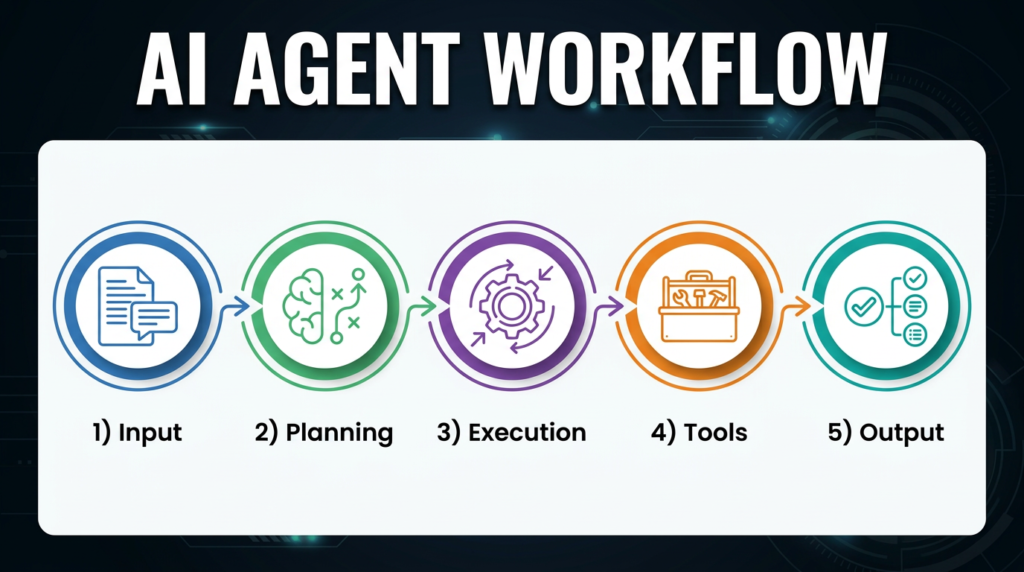
Follow these 7 steps to go from idea to a live, working AI agent. You don’t need to write a single line of code.
Step 1
Choose an AI Agent Idea
Start with a specific problem you want to solve. The narrower, the better. Great starter ideas include:
- Customer support agent — answers FAQs, handles refund requests
- Content writing agent — drafts blog posts, social media captions
- SEO research agent — finds keywords, analyzes competitors
- Lead generation agent — finds and qualifies prospects
- Email automation agent — writes and schedules outreach campaigns
- E-commerce assistant — product recommendations, order tracking
Step 2
Define the Agent’s Goal
Every effective AI agent has a crystal-clear purpose. Write a “system prompt” — a set of instructions that tells your agent who it is, what it does, and how it should behave. Include:
- The agent’s role and persona (“You are a friendly customer support specialist for…”)
- What it should and shouldn’t do
- The tone and format of responses
- Any data it should reference (your knowledge base, FAQs, pricing)
Need inspiration? Anthropic’s prompt engineering guide is one of the best free resources available.
Step 3
Select a No-Code Tool
Match the tool to the use case:
- Simple chatbot or writing agent → Claude or ChatGPT
- Multi-step workflow automation → n8n or Zapier AI
- Custom AI web app → Bolt or Lovable
- RAG / document-based agent → Flowise
- Code-assisted agent → Replit
Step 4
Build the Workflow
In your chosen tool, visually map out the agent’s logic:
- Input: What triggers the agent? (user message, form submission, schedule)
- Processing: What does the AI decide? (classify intent, generate response)
- Output: What happens next? (send email, update database, reply to user)
- Error handling: What if something goes wrong? (fallback message, human escalation)
Step 5
Connect External Tools
This is where AI agents become truly powerful. Most no-code platforms offer one-click integrations with:
GmailGoogle SheetsNotionSlackHubSpot CRMAirtableStripeShopifyCalendlyWhatsApp
Step 6
Test the Agent
Before going live, run your agent through at least 20 test scenarios — including edge cases and tricky inputs. Check for:
- Accuracy of responses (does it answer correctly?)
- Tone consistency (does it sound right for your brand?)
- Error handling (does it fail gracefully?)
- Speed (does it respond within acceptable time?)
Iterate on your system prompt based on what you find. PromptingGuide.ai has excellent resources on prompt optimization.
Step 7
Deploy the Agent
Once tested, deploy your agent where your users are:
- Website widget — embed a chat widget on any site
- Internal tools — Slack bot or Notion integration for your team
- SaaS product — embed AI features inside your own app
- Mobile app — via API integration with your mobile backend
- WhatsApp / SMS — through Twilio or similar platforms
Real Examples of AI Agents You Can Build Today
🎧
Customer Support Agent
Handles 80% of support tickets automatically: answers FAQs, processes refunds, tracks orders, and escalates complex cases to humans.
🔍
SEO Research Agent
Scans competitor sites, finds keyword gaps, analyzes search intent, and produces complete content briefs in minutes.
📱
Social Media Agent
Generates 30 days of content calendar entries, writes captions, suggests hashtags, and schedules posts across platforms.
📧
Sales Outreach Agent
Researches prospects, writes personalized cold emails, follows up automatically, and logs activity to your CRM.
🏠
Real Estate Agent
Qualifies buyer/seller leads via chat, books property tours, answers listing questions, and sends follow-up summaries.
📦
Dropshipping Assistant
Monitors supplier inventory, updates product listings, handles order status inquiries, and alerts you to pricing changes.
📊
Market Research Agent
Pulls data from multiple sources, synthesizes industry trends, and produces formatted reports with actionable insights.
✉️
Email Automation Agent
Categorizes inbound emails, drafts replies in your tone, prioritizes urgent messages, and manages newsletter campaigns.
📊 How Businesses Are Adopting AI Agents — Industry Breakdown
- Industry Adoption Rate (2026)
- SaaS / Tech 34%E-commerce 24%Agencies 18%Healthcare 12%Real Estate 12%
- Revenue Potential by Monetization Method
- SaaS Subscriptions 38%Freelance/Agency 27%Marketplace Sales 18%Consulting 17%
10 Common Mistakes Beginners Make
Avoid these pitfalls that trip up most first-time AI agent builders:
- Vague system prompts. “Be helpful” is not an instruction. Be specific about persona, tone, scope, and output format.
- Trying to do too much. Building a single agent that handles every task leads to confusion. Start with one focused use case.
- Skipping testing. Deploying without testing 20+ scenarios leads to embarrassing failures in front of real users.
- Ignoring error handling. What happens when the AI doesn’t know the answer? Always define a graceful fallback.
- No knowledge base. Agents need context. Without a connected document store or FAQ database, they’ll hallucinate.
- Choosing the wrong tool. Using ChatGPT for a complex multi-step automation that requires n8n wastes hours.
- Not tracking performance. Set up logging from day one. You can’t improve what you can’t measure.
- Overlooking security. Never put API keys in public prompts. Use environment variables and access controls.
- Ignoring rate limits. Free tiers have usage caps. Budget for API costs before your agent goes viral.
- Not iterating on prompts. Your first system prompt won’t be perfect. Plan for weekly refinements based on real user interactions.
How Much Does It Cost to Build an AI Agent?
The cost to build an AI agent has collapsed in 2026. Here’s a realistic breakdown:
$0
Free Tier
Claude Free, ChatGPT Free, n8n self-hosted. Best for testing and learning. Limited usage and features.
Most Popular
$20–$50
Per Month
Claude Pro + n8n Cloud + one integration tool. Covers most solo entrepreneur and freelancer needs.
$100–$200
Per Month
Professional setup with dedicated API access, custom domain, and multiple connected services for agencies.
$500+
Per Month
Enterprise solutions with custom LLM fine-tuning, dedicated infrastructure, SLAs, and team access.
For a detailed pricing comparison, Zapier’s AI agent pricing guide is updated monthly.
How to Make Money With AI Agents
Building AI agents isn’t just about productivity — it’s a genuine business opportunity. Here are the top monetization strategies in 2026:
🛒 Sell Pre-Built Agents
List ready-made agents on platforms like Claude’s tool store, the GPT Store, or Gumroad. Prices range from $29–$499 per agent. Top sellers earn $3,000–$15,000/month.
💼 AI Automation Freelancing
Freelancers on Upwork and Fiverr specializing in AI automation now charge $75–$250/hour. Demand for no-code AI builders has outpaced supply.
📦 Subscription SaaS
Wrap your agent in a simple UI and charge a monthly fee. Even a niche SaaS ($29/month) with 100 subscribers generates $2,900/month in recurring revenue.
🏢 Agency Services
Build and manage AI agents for local businesses on a retainer ($500–$3,000/month per client). Just 5 clients = a $25,000/year side business.
🎓 Education & Consulting
Create courses or consulting packages teaching others how to build agents. This market is growing at 40% year-over-year on platforms like Udemy and Maven.
For additional business model inspiration, Entrepreneur Magazine’s AI Business section covers emerging monetization strategies monthly.
The Future of AI Agents: 2026–2030
We are at the very beginning of the AI agent revolution. Here’s what the next four years will bring:
2026
Multi-Agent Collaboration
Multiple specialized agents working together in networks — one researches, one writes, one publishes, one analyzes — creating fully autonomous content and sales pipelines.
2027
AI Employees
Companies will hire “AI employees” — persistent agents with memory, accountability, and defined roles in organizational charts. Expect dedicated job titles like “AI Agent Manager.”
2028
Agent Marketplaces Mature
App-store-style marketplaces for pre-built AI agents will become billion-dollar platforms. Indie developers will generate significant income selling specialized agents.
2029–2030
Autonomous Business Operations
Micro-businesses run almost entirely by AI agents become viable — from marketing to customer support to accounting. Human role shifts to strategic oversight and creative direction.
According to OpenAI’s roadmap and independent analysts, AI agents will automate an estimated 30% of current white-collar work tasks by 2030 — creating new categories of opportunity for entrepreneurs who build and own the agents doing that work.
Conclusion
The window to build an AI agent business is open right now — and it won’t stay this accessible forever. As competition grows and the technology matures, the early movers will have built brand authority, customer bases, and recurring revenue streams that are very difficult to replicate.
You don’t need to be a programmer. You don’t need venture capital. You don’t need a team. You need a specific problem, a clear system prompt, a no-code tool, and the willingness to test and iterate.
Start with one simple agent this week. Build something for your own business, or for a client. Learn the tools, understand the prompting craft, and watch what happens when you connect your agent to the world. The compounding effect of AI automation is extraordinary — and it starts with a single step.
🚀 Your Next Steps
- Create a free account on Claude.ai or ChatGPT today
- Pick ONE use case from the examples in this guide
- Write your first system prompt using Anthropic’s prompt engineering guide
- Test your agent with at least 20 scenarios before sharing it
- Join a no-code AI community (Reddit’s r/nocode or the n8n community) to learn from others
Authority Sources & Further Reading
- 🔗 Anthropic Research — AI Agent Safety and Capabilities — In-depth research on how modern AI agents are designed and evaluated.
- 🔗 McKinsey Global Institute — The State of AI 2026 — Enterprise adoption data and economic impact projections.
- 🔗 Gartner AI Insights — Market forecasts and technology adoption curves for AI agents.
- 🔗 Zapier AI Automation Blog — Practical tutorials and use cases for no-code AI automation.
- 🔗 PromptingGuide.ai — Community-maintained guide to prompt engineering for AI agents.
Frequently Asked Questions
Q1: Do I need any technical knowledge to build an AI agent in 2026?
No. Modern no-code platforms like Claude, Bolt, and n8n have made it possible to build functional AI agents using natural language instructions and visual drag-and-drop interfaces. If you can write an email, you have the skills to build a basic AI agent.
Q2: How long does it take to build an AI agent?
A simple agent (chatbot or writing assistant) can be built in 30–60 minutes. A more complex agent with external tool integrations typically takes 4–8 hours spread over a few days of testing and iteration. Full-featured AI SaaS products may take 2–4 weeks.
Q3: What is the best no-code AI agent platform for beginners?
For absolute beginners, Claude (claude.ai) and ChatGPT are the most accessible starting points — both have intuitive interfaces and free tiers. For automation workflows, n8n and Zapier are excellent next steps. For building full apps, Bolt or Lovable offer the simplest path from idea to deployment.
Q4: Can AI agents replace human employees?
AI agents can automate repetitive, rule-based tasks and handle high-volume workflows without fatigue. However, they excel as augmentation tools rather than full replacements. Strategic thinking, emotional intelligence, complex relationship management, and creative direction still require human oversight in 2026.
Q5: How do I make money from AI agents?
The top revenue models include: selling pre-built agents on marketplaces ($29–$499 one-time), offering AI automation services as a freelancer ($75–$250/hour), building and monetizing your own SaaS product ($10–$199/month per user), or consulting with businesses on AI agent strategy ($150–$500/hour).
Q6: Are AI agents safe to use for business data?
Security depends on the platform and configuration. Always use environment variables for API keys, choose platforms with SOC 2 compliance for sensitive data, review each platform’s data retention policies, and never include personally identifiable information in public system prompts. Anthropic, OpenAI, and major platforms offer enterprise tiers with enhanced data privacy.