AI is no longer optional for freelancers. In 2026, freelancers who use AI strategically can complete projects faster, serve more clients, and increase revenue without working longer hours.
Industry surveys over the past two years have tracked a sharp rise in AI adoption among independent workers, with large shares of freelancers now using AI tools daily for writing, research, design, coding, and client communication. The freelancers pulling ahead aren’t the ones using the most tools — they’re the ones who’ve built a lean, repeatable stack around the two or three tools that actually move their work forward.
This guide ranks the AI tools freelancers are actually paying for and actually using in 2026, based on real workflows rather than marketing claims, with honest pros, cons, and pricing for each.
How We Chose These Tools
Every tool on this list was evaluated against six factors:
- Real-world usefulness — does it solve an actual freelance workflow problem, not just a demo-able trick?
- Freelancer adoption — is it something independent workers are genuinely paying for at scale?
- Time saved — does it measurably cut hours off research, drafting, design, or coding work?
- Ease of learning — can a non-technical freelancer get value in under a day?
- Value for money — does the subscription cost pay for itself in billable time?
- Quality of output — does it reduce editing time, or create more cleanup work than it saves?
1. ChatGPT — Best Overall AI Tool for Freelancers
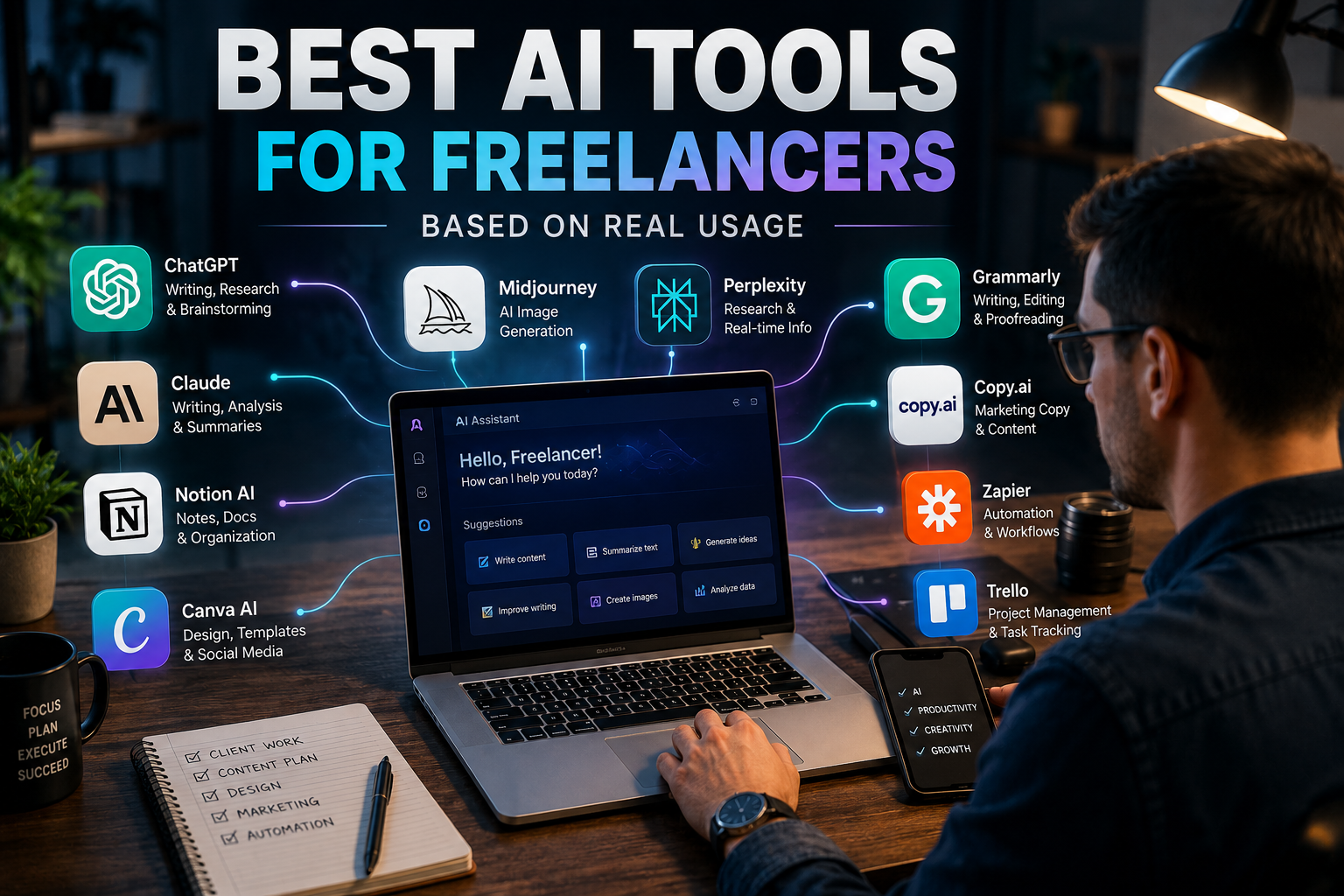
ChatGPT remains the default daily driver for most freelancers because it’s genuinely useful across the entire freelance workflow: research, drafting, client emails, proposals, brainstorming, and light automation, all in one interface.
Freelancers commonly use it to draft the first version of a client proposal in minutes instead of an hour, summarize a messy client brief into a clear scope of work, or brainstorm content angles before writing. Its Custom GPTs and Projects features let freelancers save brand voice instructions, client style guides, and recurring prompt templates so they’re not re-explaining context every session.
Pros: Broadest feature set (web browsing, file uploads, image generation, voice mode); strong general-purpose writing and reasoning; large ecosystem of templates and guides.
Cons: Can produce generic-sounding first drafts without strong prompting; message limits on the paid tier during peak hours; less specialized than Claude for very long documents.
Pricing: Free tier available (now ad-supported in the US); ChatGPT Go around $8/month; ChatGPT Plus at $20/month; ChatGPT Pro at $200/month for power users.
Best for: Virtual assistants, marketing consultants, and any freelancer who wants one tool that covers 80% of daily tasks.
2. Claude — Best for Long-Form Writing and Editing
Claude has become the preferred tool for freelancers handling long, nuanced documents — blog series, whitepapers, client style guides, and detailed editing passes — largely because of its very large context window, which lets it hold an entire document, brand guide, and previous draft in memory at once.
Content writers and copywriters use Claude to maintain a consistent brand voice across a 20-page client deliverable, something that’s harder to do in a tool that loses track of earlier instructions partway through a long session. It’s also a strong editor: feeding it a rough draft alongside a style guide tends to produce more nuanced revision suggestions than a basic grammar pass.
Pros: Excellent for long documents and nuanced, on-brand writing; strong reasoning on complex or technical content; built-in coding assistant (Claude Code) is a bonus for technical freelancers.
Cons: Smaller plugin/integration ecosystem than ChatGPT; image generation is more limited; usage caps on Pro can feel tight for very heavy daily use.
Pricing: Free tier; Claude Pro at $20/month (around $17/month billed annually); Claude Max tiers from $100–$200/month for high-volume users.
Best for: Writers, editors, and consultants producing long-form client deliverables.
3. Perplexity AI — Best Research Tool
Perplexity’s core advantage for freelancers is speed: instead of opening ten browser tabs to fact-check a claim or scope out a market, you get a cited, synthesized answer in seconds, with sources you can click through to verify.
Marketing consultants use it for fast competitor research before a client pitch; writers use it to fact-check statistics before publishing; virtual assistants use it to compile quick market or vendor comparisons for clients. Because every answer comes with linked sources, it removes a step that ChatGPT and Claude don’t handle as natively — verification.
Pros: Citations built into every answer; fast for competitive and market research; Pro plan includes Deep Research for longer investigative queries.
Cons: Weaker than ChatGPT or Claude for long-form creative writing; Deep Research and search quotas have been tightened over the past year; occasional source-quality issues on niche topics.
Pricing: Free tier with basic search; Perplexity Pro at $20/month (around $16.67/month annually).
Best for: Marketing freelancers, journalists-turned-freelancers, and anyone doing frequent client-facing research.
4. Canva AI — Best for Design Freelancers

A typical workflow: a freelancer drops in a client’s brand colors and logo, generates several social post variations with Magic Design, swaps copy with Magic Write, and removes a distracting background with one click — turning what used to be a 45-minute task into closer to 10 minutes. It’s particularly strong for social graphics, client presentations, video thumbnails, and marketing one-pagers.
Pros: No design skill required; AI features live inside the same editor as templates and assets; commercially licensed output on paid plans.
Cons: Not a substitute for advanced tools like Photoshop for complex photo editing; “Magic Studio” usage credits run out faster than expected on heavy weeks.
Pricing: Free plan; Canva Pro around $10–15/month (billed annually vs. monthly); Canva Business around $16.67/user/month.
Best for: Designers, social media managers, and any freelancer who needs fast, professional-looking visuals without a design background.
5. Grammarly — Best Editing Assistant
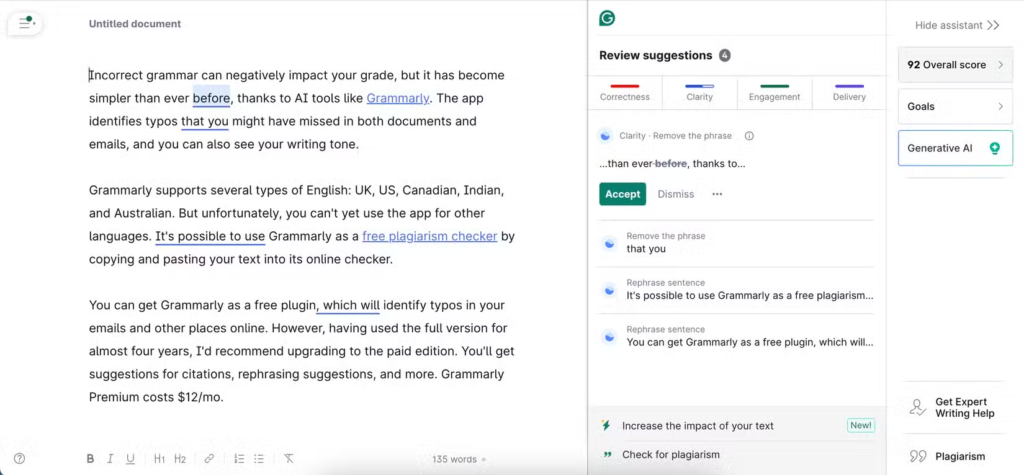
Grammarly’s AI-powered tone and clarity suggestions have become a quiet but consistent part of the freelance workflow — not as the star tool, but as the safety net running underneath everything else.
Freelancers use it to catch tone issues before sending a client email (is this read as curt or confident?), polish a Word-tier proposal before submission, and run a final pass over blog drafts after the heavier AI writing tools have done their work. The tone-detection feature in particular has become popular for client-facing communication, where misjudged tone can cost a relationship.
Pros: Strong tone and clarity detection; works across browser, desktop, and Google Docs; catches errors other AI writing tools introduce.
Cons: Not a content generator — it’s a polish layer, not a starting point; premium tone and plagiarism features are gated behind the paid plan.
Pricing: Free tier; Grammarly Premium typically $12–30/month depending on billing term.
Best for: Writers, copywriters, and any freelancer sending frequent client-facing emails or documents.
6. Notion AI — Best Productivity Tool
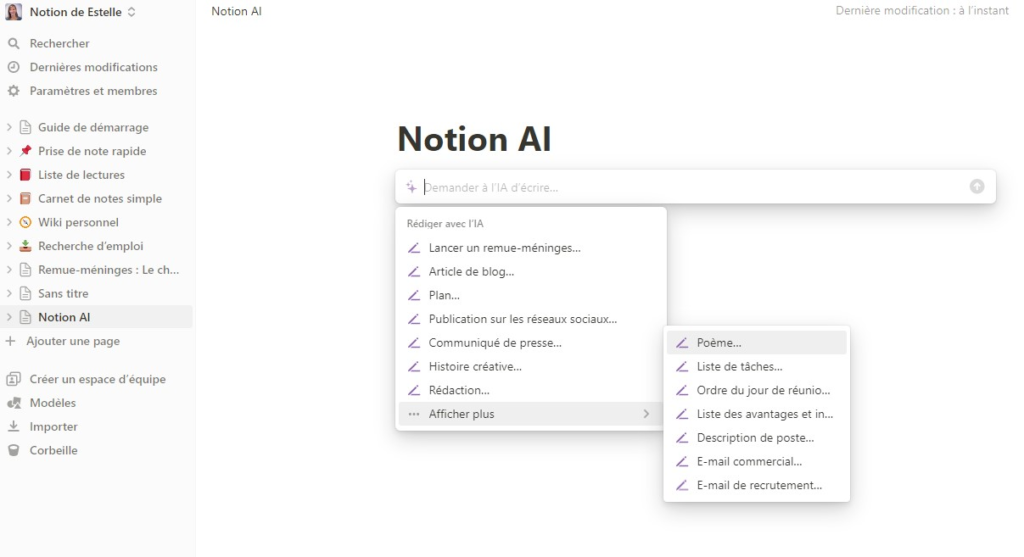
Notion AI works because it’s layered into a workspace many freelancers already use for project management, client notes, and content calendars — so the AI features (summarizing meeting notes, drafting project briefs, auto-generating subtasks) slot into an existing system rather than requiring a new one.
Virtual assistants in particular lean on Notion AI to turn a messy client call transcript into a clean action-item list, or to maintain a single source of truth for recurring client knowledge instead of digging through old email threads.
Pros: Combines project management and AI in one workspace; good for knowledge management across multiple clients; flexible enough to build custom systems (CRMs, content calendars, trackers).
Cons: The AI add-on is a separate cost layered on top of a Notion plan; steeper learning curve than a simple to-do app if you’re building from scratch.
Pricing: Notion AI add-on around $8–10/month on top of a paid Notion plan (Notion plans start free, Plus tier around $10–12/month).
Best for: Virtual assistants, consultants, and freelancers managing multiple clients who need a single home for notes, tasks, and calendars.
7. GitHub Copilot — Best for Freelance Developers
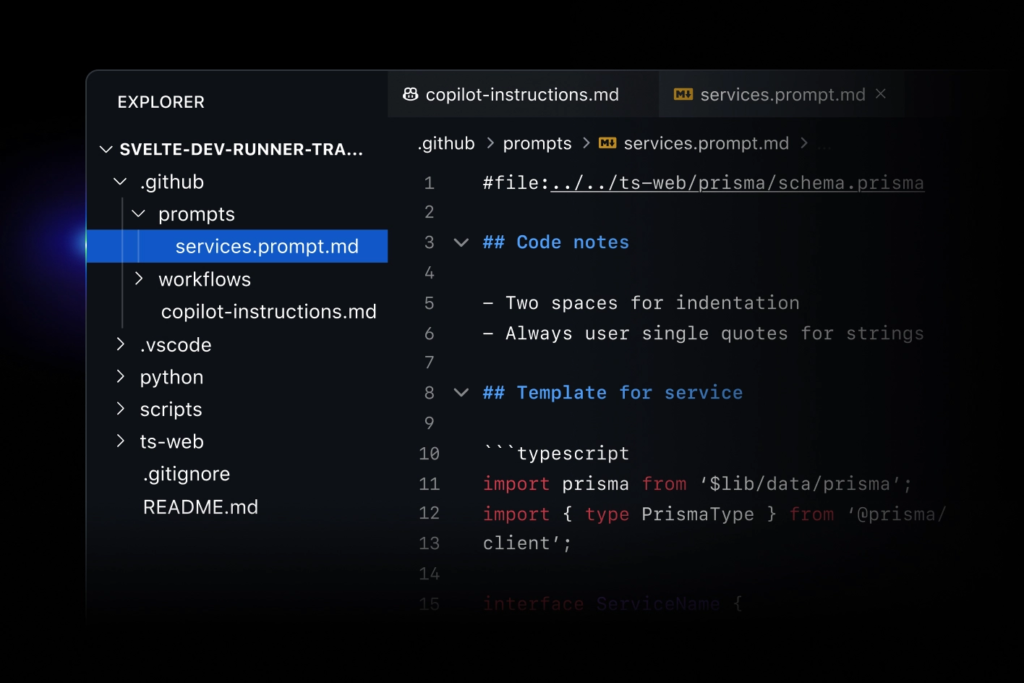
For freelance web developers, GitHub Copilot has become close to table stakes. It autocompletes code in real time inside the editor, suggests entire functions based on context, and speeds up the most repetitive parts of development — boilerplate, test scaffolding, and common patterns.
Developers report the biggest time savings on smaller client sites and integrations, where Copilot can draft most of a standard component or API call, leaving the freelancer to review and adjust rather than type from scratch.
Pros: Deep IDE integration (VS Code, JetBrains, and more); strong at boilerplate and pattern completion; speeds up debugging by suggesting fixes inline.
Cons: Suggestions need review — it will confidently generate code that’s subtly wrong; less useful for novel architecture decisions than for routine code.
Pricing: Free tier for verified students/some open-source maintainers; Copilot Pro around $10/month; Copilot Pro+ around $39/month for access to premium models.
Best for: Freelance web and software developers doing day-to-day implementation work.
8. Cursor — Best AI Coding Workspace
Cursor takes the Copilot concept further by building an entire editor around AI, with full-project context, multi-file refactoring, and AI agents that can work across a codebase rather than one file at a time.
Developers building or maintaining larger client projects tend to reach for Cursor specifically because it understands the relationships between files — useful when refactoring a feature that touches multiple parts of a codebase, something single-file autocomplete tools handle less gracefully.
Pros: Full-project awareness, not just single-file completion; strong at refactoring and multi-step coding tasks; AI agent mode can handle more autonomous coding tasks.
Cons: Steeper learning curve if you’re used to a traditional editor; can be overkill for very small, simple projects.
Pricing: Free tier with limited usage; Cursor Pro around $20/month; Cursor Pro+ around $60/month for heavier usage.
Best for: Developers working on larger, multi-file client codebases or doing frequent refactoring work.
9. Adobe Firefly — Best for Creative Professionals
Adobe Firefly’s main selling point for freelancers is that its generative output is trained to be commercially safe, which matters for designers delivering client work that needs clear usage rights. It’s also now woven directly into Photoshop (Generative Fill) and Illustrator, so freelancers already in the Adobe ecosystem get AI image generation without switching tools.
Designers use Generative Fill to extend backgrounds, remove objects, or generate variations of a marketing asset in seconds — tasks that used to require manual retouching.

Pros: Commercially safe generative content, important for client deliverables; tightly integrated into Photoshop and Illustrator workflows; strong image quality for professional use.
Cons: Best value requires a Creative Cloud subscription, which is pricier than standalone design tools; free tier credits run out quickly on complex generations.
Pricing: Free tier with limited monthly credits; Firefly Premium standalone around $5/month; Photoshop + Firefly around $23/month; full Creative Cloud around $60/month.
Best for: Designers and creative professionals already working inside the Adobe ecosystem.
10. Zapier AI — Best for Automation
Zapier’s AI features extend its long-standing strength — connecting apps together — into smarter, more autonomous workflows: AI-drafted email responses, automatic lead qualification, and client onboarding sequences that used to require manual setup at every step.
A common freelancer use case: a new client fills out an intake form, Zapier automatically creates a project in Notion, sends a welcome email, and adds a task to the freelancer’s calendar — all without manual entry. For solopreneurs juggling multiple clients, this kind of automation is often the single highest-ROI tool on the list, because it reclaims time rather than just speeding up a single task.
Pros: Connects nearly every tool freelancers already use; turns repetitive admin work into a one-time setup; scales well as client volume grows.
Cons: Can get expensive quickly as task volume increases; initial setup takes real time investment before the payoff kicks in.
Pricing: Free tier for limited tasks/month; paid plans typically start around $20–30/month and scale with usage.
Best for: Virtual assistants, consultants, and any freelancer with repeatable client onboarding or admin workflows.
Comparison Table
| Tool | Best For | Free Plan | Starting Price | Rating |
|---|---|---|---|---|
| ChatGPT | Overall daily assistant | Yes | $20/mo (Plus) | 4.8/5 |
| Claude | Long-form writing & editing | Yes | $20/mo (Pro) | 4.7/5 |
| Perplexity AI | Research & fact-checking | Yes | $20/mo (Pro) | 4.6/5 |
| Canva AI | Design & social graphics | Yes | ~$10–15/mo (Pro) | 4.6/5 |
| Grammarly | Editing & tone | Yes | ~$12/mo (Premium) | 4.5/5 |
| Notion AI | Productivity & client notes | Limited trial | ~$8–10/mo add-on | 4.4/5 |
| GitHub Copilot | Code completion | Limited | $10/mo (Pro) | 4.6/5 |
| Cursor | AI coding workspace | Yes | $20/mo (Pro) | 4.7/5 |
| Adobe Firefly | Commercial-safe image generation | Yes | $5/mo (Premium) | 4.5/5 |
| Zapier AI | Workflow automation | Yes | ~$20–30/mo | 4.5/5 |
Pricing changes frequently across all vendors — always confirm current rates on each provider’s official pricing page before subscribing.
Best AI Stack by Freelancer Type
Writers: ChatGPT, Claude, Grammarly
Designers: Canva AI, Adobe Firefly, ChatGPT
Developers: ChatGPT, Cursor, GitHub Copilot
Virtual Assistants: ChatGPT, Notion AI, Zapier AI
Marketing Freelancers: ChatGPT, Perplexity, Canva AI
Common Mistakes Freelancers Make With AI
- Over-relying on AI output. Treating a first draft as a final draft is the fastest way to damage client trust — AI accelerates work, it doesn’t replace judgment.
- Publishing without editing. AI-generated text often reads as slightly generic or includes confident-sounding errors; a human edit pass is non-negotiable for client-facing work.
- Ignoring fact-checking. Even research-focused tools with citations can misread a source; verify anything that goes into a client deliverable with real consequences.
- Using too many tools. Subscribing to ten overlapping tools costs more than it saves — most freelancers do better with two or three tools used well.
- Not building repeatable systems. One-off prompts get one-off results. Freelancers who save reusable prompt templates, brand voice instructions, and automation workflows see far better long-term ROI than those starting from scratch each time.
Future of AI Freelancing
AI is increasingly functioning as a productivity multiplier rather than a replacement for freelancers. Industry research suggests freelancers are using AI tools to support — not substitute — their work and ongoing skill development, with human judgment, client relationships, and creative direction remaining the parts of the job AI hasn’t meaningfully encroached on.
The freelancers seeing the clearest gains aren’t necessarily the most technical ones — they’re the ones who’ve built a consistent system: a small stack of tools, reusable templates, and a habit of editing rather than blindly publishing AI output.
Conclusion
For most freelancers, the best balance of productivity and ROI comes from a focused stack rather than a sprawling one. Based on real-world usage patterns in 2026, five tools stand out:
- ChatGPT
- Claude
- Perplexity
- Canva AI
- Grammarly
Start with one or two that match your work — a writer doesn’t need Cursor, and a developer doesn’t need Canva — and build outward only when a clear, repeatable use case justifies the added cost.
FAQs
What is the best AI tool for freelancers?
ChatGPT is the best all-around choice for most freelancers because it covers research, writing, client communication, and brainstorming in a single tool. Specialists — writers, designers, developers — often pair it with a second tool suited to their niche (Claude for long-form writing, Canva for design, Cursor for code).
Is ChatGPT worth it for freelancers?
For most freelancers doing regular client work, yes — the $20/month Plus plan typically pays for itself within a few hours of saved drafting and research time per month.
Which AI tool is best for freelance writers?
Claude is generally preferred for long-form writing and editing because of its large context window and consistency across long documents, often paired with Grammarly for a final polish pass.
Can AI replace freelancers?
No — AI handles drafting, research, and repetitive tasks faster, but client relationships, creative judgment, strategic decisions, and quality control still require a human freelancer. AI is best understood as a productivity multiplier, not a replacement.
What AI tools do top freelancers use?
Most experienced freelancers run a lean stack of two to three tools matched to their niche — commonly ChatGPT or Claude as a daily driver, plus one specialized tool (Canva, Cursor, or Perplexity) rather than subscribing to every available tool.