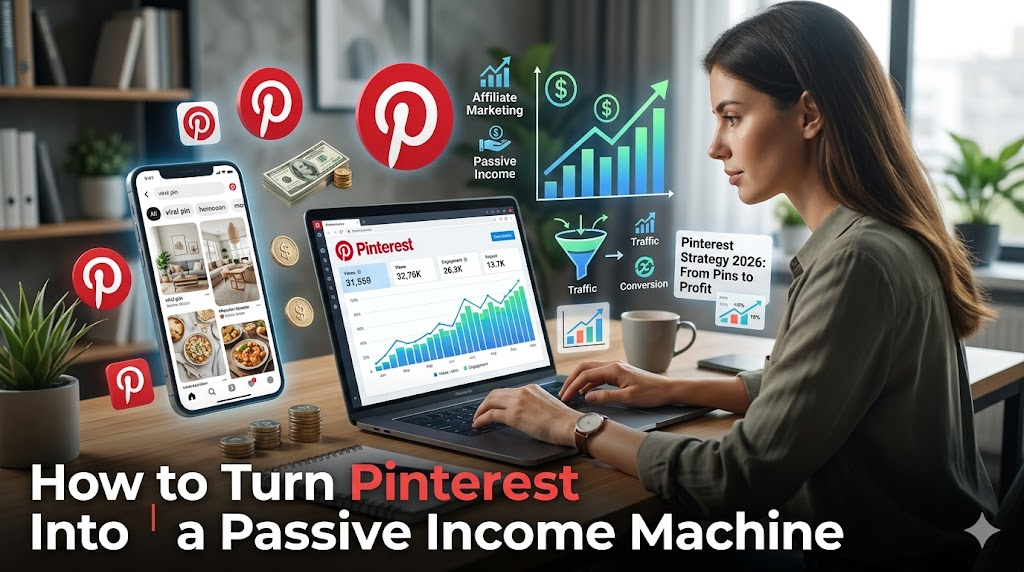
Most people treat Pinterest like a mood board — a place to save recipes they’ll never cook and home decor they’ll never buy. But a growing number of creators are quietly earning hundreds, and sometimes thousands, of dollars a month from this platform, almost on autopilot.
The secret? Pinterest isn’t just a social network. It’s a visual search engine — and that changes everything about how you use it to make money.
In this guide, you’ll learn exactly how to set up Pinterest as a passive income stream in 2026, even if you’re starting from scratch with zero followers. No fluff, no overnight-millionaire promises — just a clear, working system.
What Makes Pinterest Different From Instagram or TikTok?
Before diving into the steps, it’s worth understanding why Pinterest works so well for passive income.
On Instagram or TikTok, a post dies within 24–48 hours. Pinterest is the opposite. A single Pin can drive traffic for months or even years after you post it, because people search for content rather than scroll through a feed. That’s what makes it a passive income goldmine — you do the work once, and the platform keeps delivering results long after.
Step 1: Set Up a Business Account the Right Way
Why You Need a Business Account
A personal Pinterest account won’t cut it here. A free Pinterest Business account gives you access to analytics, rich pins, and promotional tools that personal accounts don’t offer.
How to do it:
- Go to pinterest.com/business/create
- Enter your email, create a password, and fill in your business name
- Choose your business type (Creator, Retailer, or Online Marketplace all work)
- Add your website URL — this is critical for driving traffic and enabling rich pins
Pro Tip: If you already have a personal Pinterest account, you can convert it to a business account without losing your existing pins. Go to Settings → Account → Convert to Business.
Optimize Your Profile for Search
Think of your Pinterest profile like a mini landing page. Use these best practices:
- Profile name: Include a keyword, e.g., “Sarah | Budget Travel Tips” instead of just “Sarah”
- Bio: Write 2–3 sentences that describe who you help and how. Example: “I help busy moms plan healthy meals on a $100/week grocery budget. Find my best recipes, meal plans, and shopping lists here.”
- Profile photo: Use a clean headshot or a clear logo — no blurry photos
Step 2: Choose a Profitable Niche
Pick a Niche With Buying Intent
Not all niches perform equally on Pinterest. The platform’s audience tends to be solution-seeking — they’re looking for answers, ideas, and products. The best niches combine high search volume with purchasing intent.
Top-performing niches :
| Niche | Why It Works |
|---|---|
| Personal Finance & Budgeting | People want money solutions |
| Home Decor & DIY | Highly visual, lots of product links |
| Food & Recipes | Evergreen and hugely searchable |
| Health & Fitness | Strong affiliate and product market |
| Parenting & Kids Activities | Devoted, loyal audience |
| Travel | Aspirational + product/hotel bookings |
| Digital Products | High margins, no inventory |
Don’t Try to Cover Everything
A focused niche always outperforms a scattered one. If your board covers everything from keto recipes to cryptocurrency, Pinterest’s algorithm won’t know who to show your content to.
Example: Instead of “Healthy Living,” niche down to “Meal Prep for Working Moms.”
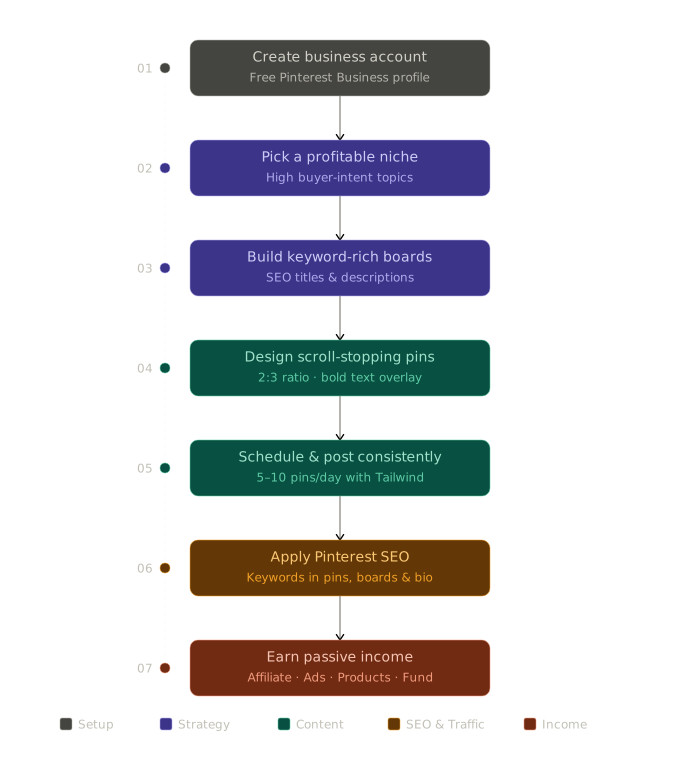
Here come two visuals — a step-by-step flowchart of the full system, followed by a pie/donut breakdown of income sources.
Step 3: Create Boards That Act Like Landing Pages
Build Keyword-Rich Boards
Each board you create is indexed by Pinterest’s search engine. That means your board titles and descriptions need to include real search terms people type.
How to name your boards:
- Bad: “My Favorite Recipes”
- Good: “Easy 30-Minute Weeknight Dinners”
- Even better: “30-Minute Dinner Recipes for Busy Families”
Board description example:
“Quick and easy dinner recipes ready in 30 minutes or less. Perfect for busy weeknights when you don’t have time to cook elaborate meals. Includes chicken, pasta, vegetarian, and budget-friendly ideas.”
Notice how it flows naturally but still includes searchable keywords.
Start With 8–10 Focused Boards
Don’t create 50 boards on day one. Start with 8–10 that are tightly related to your niche. You can always expand later once your account starts gaining traction.
Step 4: Design Pins That Stop the Scroll
The Anatomy of a High-Click Pin
Pinterest is a visual platform, so your pin design directly affects your income. Here’s what works in 2026:
- Vertical format: Use a 2:3 ratio (1000 x 1500 px) — this takes up more screen space in feeds
- Bold, readable text overlay: Use large fonts. If someone can’t read it on a phone screen in 2 seconds, redesign it
- Contrasting colors: Light text on dark backgrounds, or vice versa — avoid muddy color combinations
- Faces and people: Pins with human faces tend to perform better for lifestyle niches
- Clear value statement: Tell viewers exactly what they’ll get. Example: “5 Budget Meals Under $2 Per Serving”
Free Tools to Design Pins
- Canva (free tier is more than enough) — has pre-made Pinterest templates
- Adobe Express — great for quick batch-designing
- PicMonkey — good for adding text effects
Pro Tip: Batch-create 20–30 pins in one sitting rather than making them one by one. This saves enormous time and keeps your posting consistent.
Step 5: Set Up Your Passive Income Streams
This is where Pinterest turns into an actual money-maker. Here are the four main ways to monetize.
Option A: Affiliate Marketing (Best for Beginners)
Affiliate marketing means sharing links to other companies’ products and earning a commission when someone buys through your link. No product creation, no inventory, no customer service.
How to start:
- Join affiliate programs like Amazon Associates, ShareASale, LTK (LikeToKnow.it), or Rakuten
- Find products that genuinely fit your niche
- Create pins that link directly to your affiliate URL (Pinterest allows this as of 2026 — always check their current policy)
- Disclose your affiliate relationship in your pin description with a simple “#ad” or “affiliate link”
Example: A food blogger pins a recipe roundup image that links to a blog post filled with Amazon affiliate links for kitchen tools mentioned in the recipes.
Option B: Drive Traffic to a Blog or Website
If you have a blog or website, Pinterest is one of the best free traffic sources available. More traffic = more ad revenue (via Google AdSense or Mediavine) + more affiliate sales.
The traffic flywheel:
Pinterest Pin → Your Blog Post → Ad Revenue + Affiliate Links → Passive Income
One viral pin can send thousands of visitors to a single blog post in a week.
Option C: Sell Digital Products
Digital products — like Canva templates, printables, eBooks, or meal planners — have essentially zero cost to fulfill. You create them once and sell them infinitely.
Where to host your products:
- Etsy — great for printables and templates
- Gumroad — simple setup for eBooks and guides
- Payhip — no transaction fees on free plan
- Your own website — most control, best margins
Example pin idea: “Free Weekly Meal Planner Printable — Download Now” leading to a landing page where you also upsell a full 4-week meal plan bundle.
Option D: Pinterest Creator Fund & Idea Pins
Pinterest has steadily expanded its Creator Rewards program. While it varies by region and eligibility, creators who post Idea Pins (Pinterest’s short-form video format) can qualify for direct monetization through the platform itself.
Check business.pinterest.com for current eligibility requirements in your country.
Step 6: Post Consistently Using a Scheduler
How Often Should You Post?
Consistency matters more than volume. Aim for 5–10 fresh pins per day — a mix of your own content and repins from others in your niche.
Use Tailwind to Automate Everything
Tailwind is the most popular Pinterest scheduling tool, and it’s approved by Pinterest directly. You can:
- Schedule a week’s worth of pins in 30 minutes
- Use “SmartLoop” to automatically repin your evergreen content
- Join Tailwind Communities to share pins with other creators
The free plan gives you 20 posts per month to test it out, and paid plans start at around $15/month — well worth it once your account gains traction.
Step 7: Use Pinterest SEO to Get Found
Keywords Are Everything
Pinterest SEO works similarly to Google SEO. Use keywords in:
- Pin titles
- Pin descriptions
- Board names and descriptions
- Your profile bio
How to find keywords: Type your niche topic into the Pinterest search bar and look at the suggested autocomplete options. Those are real searches people are making right now.
Example: Type “meal prep” and Pinterest might suggest:
- meal prep for the week
- meal prep ideas healthy
- meal prep beginners
- meal prep on a budget
Use these exact phrases in your pin descriptions naturally.
Tips for Growing Faster on Pinterest
- Pin fresh content first. Pinterest rewards new pins over repins in 2026. Aim to create original images rather than just resharing others’ content.
- Use video pins. Short video pins (6–15 seconds) get higher impressions than static images in most categories.
- Link to a fast website. If your blog takes 6 seconds to load, people bounce. Use a host with fast servers and compress your images.
- Stay consistent for 90 days. Pinterest accounts take time to build momentum. Many creators quit at 60 days, right before their account would have taken off.
- Seasonal content works. Create pins around upcoming holidays and seasons 4–6 weeks in advance — Pinterest indexes content before the event, not during it.
Frequently Asked Questions (FAQ)
Q: Do I need a blog to make money on Pinterest? No! You can use Pinterest to promote affiliate links directly, sell digital products on Etsy or Gumroad, or even promote your YouTube channel or email list.
Q: How long does it take to start earning money? Realistically, most creators start seeing meaningful income between 3 to 6 months in, assuming they’re posting consistently and using SEO best practices. Some niches with high affiliate commissions can see earlier results.
Q: Do I need thousands of followers to make money? No — and this is one of Pinterest’s biggest advantages. Because it’s a search engine, follower count matters far less than it does on Instagram. A new account with 200 followers can drive just as much traffic as an account with 20,000 if the pins are well-optimized.
Q: Is Pinterest still worth it in 2026? Absolutely. Pinterest has over 500 million monthly active users globally, and its audience actively intends to discover and buy things — which makes it far more valuable per visitor than many other social platforms.
Q: Can I do this alongside a full-time job? Yes, and that’s actually the ideal setup. Spend 30–60 minutes a day building your Pinterest presence during the first few months. Once the system is running and you’re using a scheduler like Tailwind, you can drop to a few hours a week.
Conclusion
Pinterest passive income isn’t magic — it’s a system. You build the foundation (niche, boards, profile), create content that solves real problems, connect it to monetization (affiliate links, digital products, or your blog), and then let Pinterest’s search algorithm do the heavy lifting over time.
The biggest mistake most people make is quitting too early. Pinterest rewards patience. If you stay consistent for 90 days, use the SEO techniques in this guide, and keep improving your pin designs, you’ll start to see the kind of compounding traffic that turns into real income.
Start today. Set up your business account, pick your niche, and create your first five boards. That’s all you need to get going.
Found this helpful? Share it with someone who’s been thinking about starting a side hustle. And if you have questions, drop them in the comments below.